








Legacy data tools are limited in scale, rely on static data extracts, and pose a security risk. Row Zero spreadsheets securely connect to the data warehouse, scale to a billion rows, and auto-update with the latest data. Users securely work with governed cloud data in a familiar spreadsheet - same formulas, features, and shortcuts. No files. No CSV exports. Data never leaves the cloud.
vs
Microsoft Excel
Row Zero for Excel Users
Row Zero works like Excel, but supports 1000x bigger datasets, connects to your data warehouse, and enforces enterprise security. See how Row Zero extends what Excel users already know to modern cloud data.
Trusted by over 15,000 companies
Why switch?
Why companies choose us
Many teams reach a point where data size, security, and connectivity needs outgrow a desktop spreadsheet. That is when they add Row Zero.
1000x more powerful
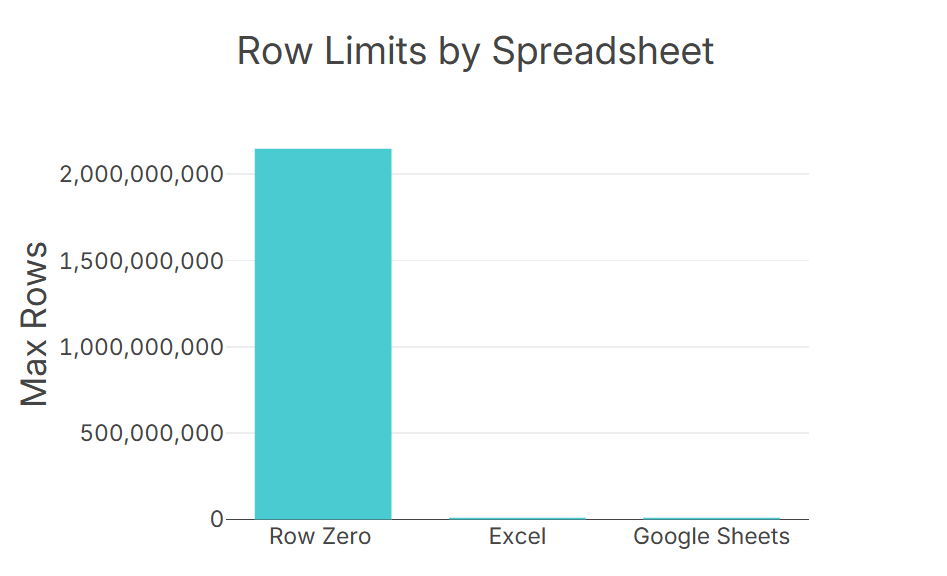
Row Zero is a cloud spreadsheet that scales to billion row data sizes, 1000x bigger than Excel's row limit. When your data is too big for Excel, Row Zero gives you the same familiar spreadsheet at cloud scale.
Explore the world's fastest spreadsheetConnected and auto-updating
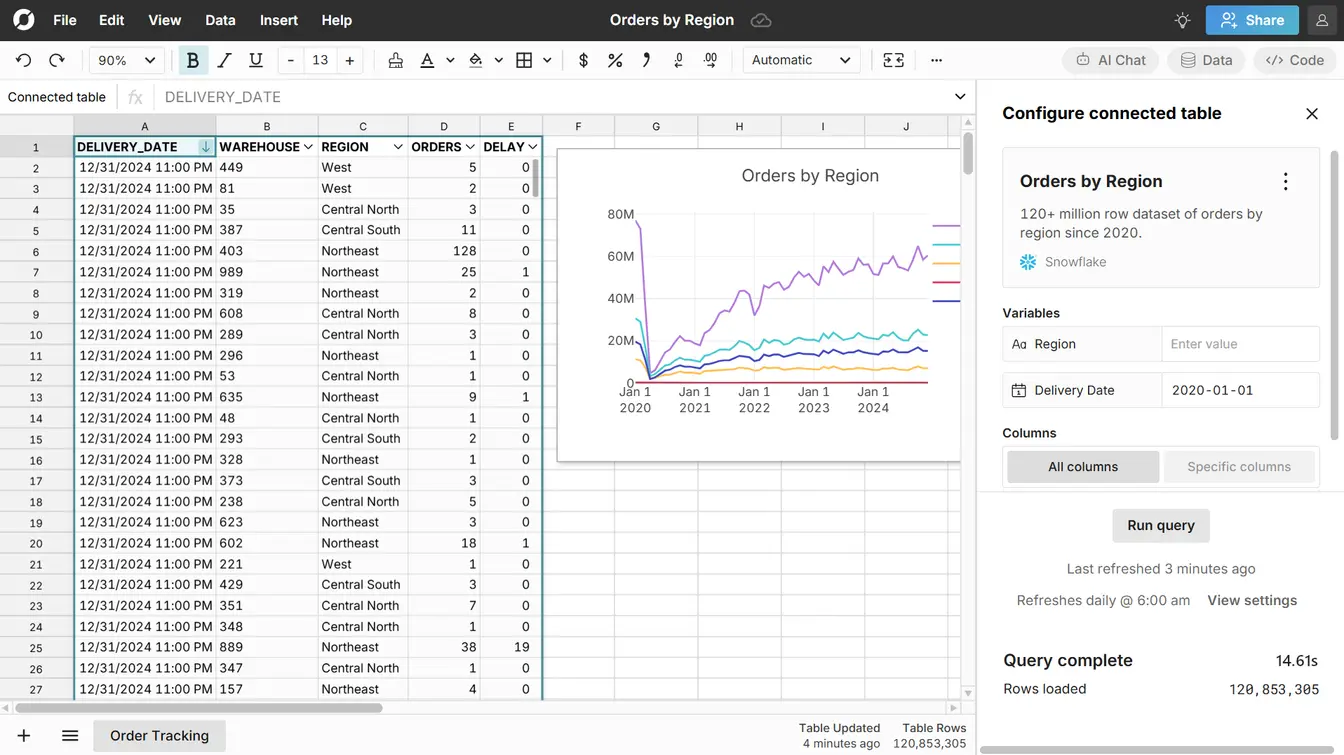
Row Zero connects directly to cloud data sources. Easily build connected spreadsheets that auto-update and write back to the data warehouse directly from your spreadsheet. Skip static exports and manual refreshes: connected spreadsheets update automatically.
Build connected spreadsheetsEnterprise Security

Row Zero is the new standard in spreadsheet security. Data is only accessible to authorized users on secure company logins via SSO, SCIM, and OAuth. Enterprises can enforce row-level security, set access controls, and restrict data export so data never leaves the cloud. Row Zero is SOC 2, GDPR, and HIPAA compliant and gives enterprises a secure alternative to Excel.
Explore enterprise security featuresA Real Spreadsheet
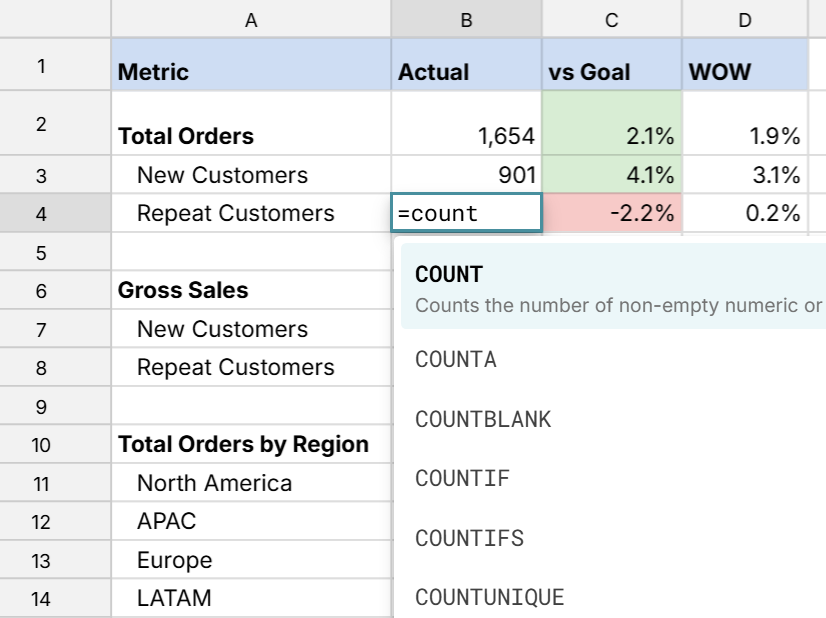
Unlike "spreadsheet-like" BI tools, Row Zero is a real spreadsheet with the functions, features, and keyboard shortcuts Excel and Google Sheets users already know. The same functions, features, and keyboard shortcuts are instantly familiar. You can import XLSX files and write Excel-compatible formulas. Edit raw data cell-by-cell or build complex multi-sheet spreadsheet models.
Explore spreadsheet featuresFeature comparison
Compare Row Zero vs Excel
Compare Row Zero vs Excel. Row Zero keeps the core Excel features and adds scale, connectivity, and security. See how the two compare.
Excel
Data Limits
Maximum rows and data capacity. Row Zero is engineered for big data with 1000x the capacity of traditional spreadsheets.
Billions of rows
~1 million rows
Performance
Speed of filtering, sorting, and calculating on large datasets.
Fastest
Slows on large files
Spreadsheet Functions
Number of built-in functions. Row Zero supports the same common functions as Excel (XLOOKUP, COUNTIFS, etc) plus several unique to Row Zero (MULTILOOKUP).
400+
500+
Dynamic Pivot Tables
Pivot tables that automatically update as source data changes without manual refresh.
With VBA
Charts & Visualizations
Built-in charting and data visualization capabilities.
Data Connectors
Built-in connectors to cloud data sources like Snowflake, Databricks, Redshift, Oracle, Postgres, and BigQuery.
Add-ins can be purchased
Large File Formats
Support for Parquet, JSONL, .gz, and other big data file formats natively in the spreadsheet. Easily open large CSVs too big for Excel.
AI spreadsheet assistant
Analyze data with open-ended prompts or specific commands.
Coding & Custom Functions
Built-in programming support for custom functions, automation, and complex modeling.
Native Python
VBA + limited Python availability
Real-time Collaboration
Multi-user editing and sharing. Real-time data updates.
Available in Excel 365
Modern cloud security
No files. No CSV exports. Data never leaves the cloud. Enable SSO, role-based access controls, row-level security, Private Link, and export restrictions.
Varies by configuration
Modern data stack for Excel users
Without Row Zero
Cloud data warehouse
BI tools
Dashboard overload
CSVs
Security nightmare
Spreadsheets
Performance issues
VS
VS
With Row Zero
Cloud data warehouse
Connected spreadsheet
Massive Scale
Live Data
Secure & Governed
Compare total cost of ownership
For many organizations, Row Zero offers a significantly lower total cost of ownership compared to using traditional spreadsheets when you factor in the infrastructure, workarounds, and human capital needed to empower teams to securely work with live data in spreadsheets.
With Row Zero
Security is default, data connectors are built-in, and anyone can truly self-serve large, production datasets. There is no middleware, no plugins, no giant backlog of data requests. Many customers eliminate their BI tools entirely or reduce licenses.
Without Row Zero
Teams use BI tools to stage data for exports to Excel, pay for plugins to connect Excel to data sources, and build out a complicated governance apparatus to try to keep data secure. Data teams have to keep building BI dashboards or create data extracts to help business teams operate and answer questions. The end result is a lot of expensive licenses and human resources for a legacy solution that still lacks the scale and security advantages of the cloud.
Try Row Zero for free
You can try Row Zero for free and see what makes Row Zero the modern alternative to Excel. Here are some easy ways to get started:
- Explore our large datasets and sample spreadsheets to test the tool.
- Schedule a live demo to see how Row Zero can solve your Excel issues.
- If you have a file too big for Excel, open it in Row Zero
- If your Excel workbook is slow, open it in Row Zero and enjoy a faster ride.
Frequently asked questions
The Excel maximum row limit is 1,048,576 rows. If you try to import a file larger than this, Excel will truncate the file at this row limit. Note, this is the maximum row limit. In practice, Excel may crash or slow down below this limit depending on your dataset and analysis.
Yes, Row Zero is a good replacement for Excel, especially for companies that need to work with big data in a spreadsheet or want to enforce modern cloud security for spreadsheets. Row Zero gives teams a secure alternative to Excel for big data. You can even import XLSX files into Row Zero.
Row Zero and Google Sheets are both good Excel alternatives. Row Zero is better for big data and security and Google Sheets is better for Excel compatibility and integration with Google Workspace.
Google Sheets and Excel online are similar spreadsheets. In fact, they are similar enough that you can convert basic spreadsheets from Excel to Google Sheets and vice versa without much issue. The biggest difference between Excel and Google Sheets is integration with other workspace tools - Excel 365 better integrates with Microsoft 365 tools like Powerpoint and Word and Google Sheets integrates better with Google Workspace (Google Docs, Slides, etc.). Excel desktop is a bit more different than Google Sheets, but both are similar.
Both versions of Excel have all of the core spreadsheet features like formulas, formatting, filter/sort, charts, and pivot tables. Excel online offers some additional features like real-time collaboration, cross-platform accessibility, link sharing, easier connectivity to other online tools, and cutting edge features like dynamic arrays and AI integration.
The best spreadsheet for you will depend on your needs. If you need big data power, data connectivity, or enterprise security, then Row Zero is a good alternative to Excel. If you want to seamlessly integrate with your existing workspace and don't need to work with big data, then Google Sheets may be a better Excel alternative.
Get started with Row Zero